
With AxlMint, you can create an SPL token on Solana without any coding. Simply enter your token information, choose which authorities you want to keep or remove, review the cost, and confirm the creation through your wallet.
1. Connect Your Wallet and Enter the Basic Information
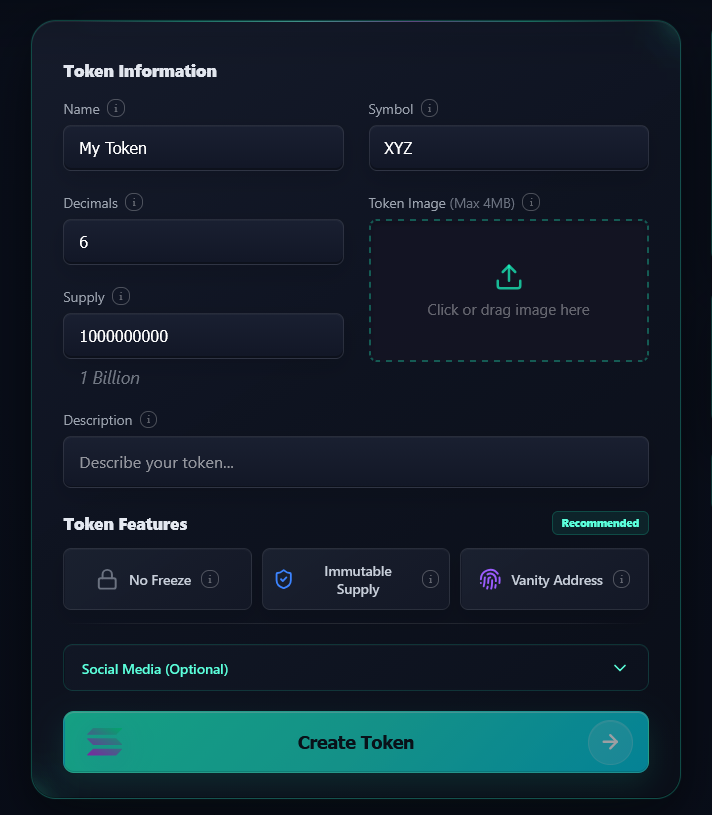
Connect your Solana wallet, open Create Token, and enter: Name, Symbol, Supply, Decimals, and Description
The Name identifies your token, the Symbol works as its ticker, and the Supply determines how many tokens will initially be created.
Under Decimals, AxlMint accepts values from 0 to 9. This setting determines how divisible each token can be.
You should also upload a token logo. A simple square image usually works best in wallets and blockchain explorers because token icons are often displayed at small sizes.
2. Understand the Authority Options
These options require special attention because some decisions are permanent.
No Freeze
No Freeze removes the Freeze Authority during token creation. This means there will no longer be an authority capable of freezing token accounts held by users. On AxlMint, this option is enabled by default.
Immutable Supply
Immutable Supply removes the Mint Authority.
Once removed, new tokens can no longer be created through that authority, meaning the existing supply cannot be increased through additional mints. If you plan to use the Mint Tokens tool in the future, do not remove the Mint Authority during token creation. Important: Revoking the Mint Authority or Freeze Authority is irreversible. Only do this when you are certain you will no longer need that authority.
3. Vanity Address Is Optional
The Vanity Address option allows you to create a token with a customized Mint Address
by searching for a specific ending for the address.
This feature is purely cosmetic and does not change how the token works.
The more specific or complex the desired ending is, the longer the generation process may take.
If you do not need a customized address, you can leave this option disabled.
4. Add Social Links If You Want
During Solana token creation, the Social Media section allows you to add public project information such as:
Website, X/Twitter, and Telegram
These fields are optional and can help users identify the official channels associated with your token.
Only add valid links that you intend to keep active.
Important: AxlMint creates the token metadata as immutable by default. Carefully review the name, symbol, image, description,
and links before creating the token, as this information is intended to remain fixed afterward.
5. Review the Live Preview and Costs
Before creating the token, review the Live Preview and check:
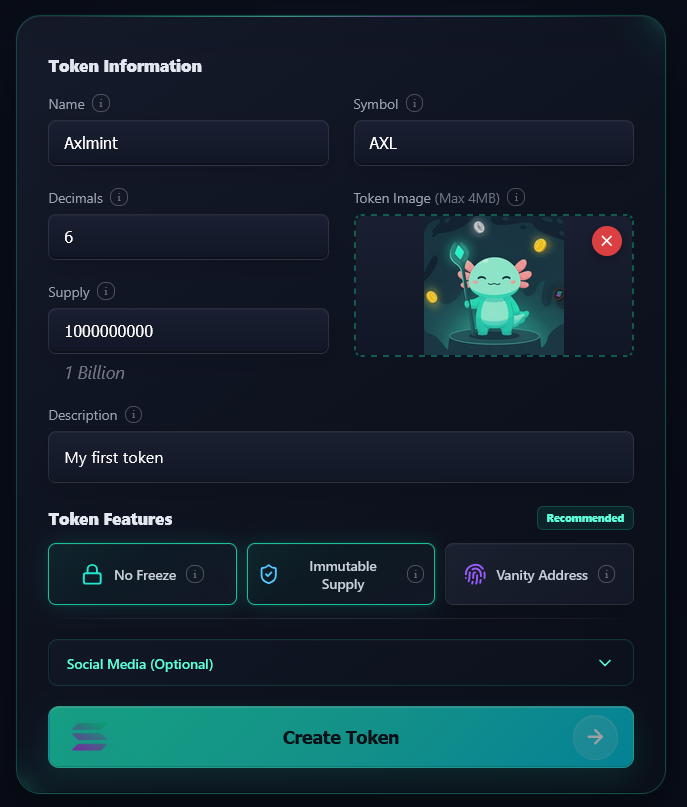
- Name
- Symbol
- Supply
- Image
- Decimals
- Authorities
- Social links
- Connected wallet
The Cost Breakdown calculates the amount based
on your selected configuration. Optional features may
change the total cost, so always use the price displayed
directly on the page rather than relying on an older
tutorial price. Your wallet will also display the normal Solana network fees.
6. Create the Token
When everything looks correct, click: Create Token
AxlMint will prepare the token creation, and your wallet will ask you to confirm the transaction.
Review the request, confirm it, and wait for the process to complete.
Once successful, AxlMint will display the new token's Mint Address and provide an option to view it on Solscan.
Save the Mint Address. It is the main identifier of your token on Solana and will be used by other AxlMint tools.
Which Configuration Should You Use for a Simple Token?
For a basic token, you can enter: Name · Symbol · Supply · Decimals · Logo · Description
Keep No Freeze according to your preferred configuration and leave Vanity Address disabled if you do not need a customized address.
The most important decision is the Mint Authority:
Keep it if you plan to create additional tokens later, or use Immutable Supply when you are certain the supply should never increase.
Creating a token does not automatically create a market for trading. If you want users to be able to buy and sell the token, the next step will usually be to create a Liquidity Pool.
Quick Summary
Connect wallet → Enter token information → Add logo → Review No Freeze and Immutable Supply → Configure Vanity Address / Socials if needed → Review Live Preview and costs → Create Token → Confirm in wallet → Save the Mint Address
AXL Tip Review everything that will become permanent, especially the metadata, Mint Authority, and Freeze Authority.
Ready to create your token?
Open the AxlMint creation tool and configure your token without coding.